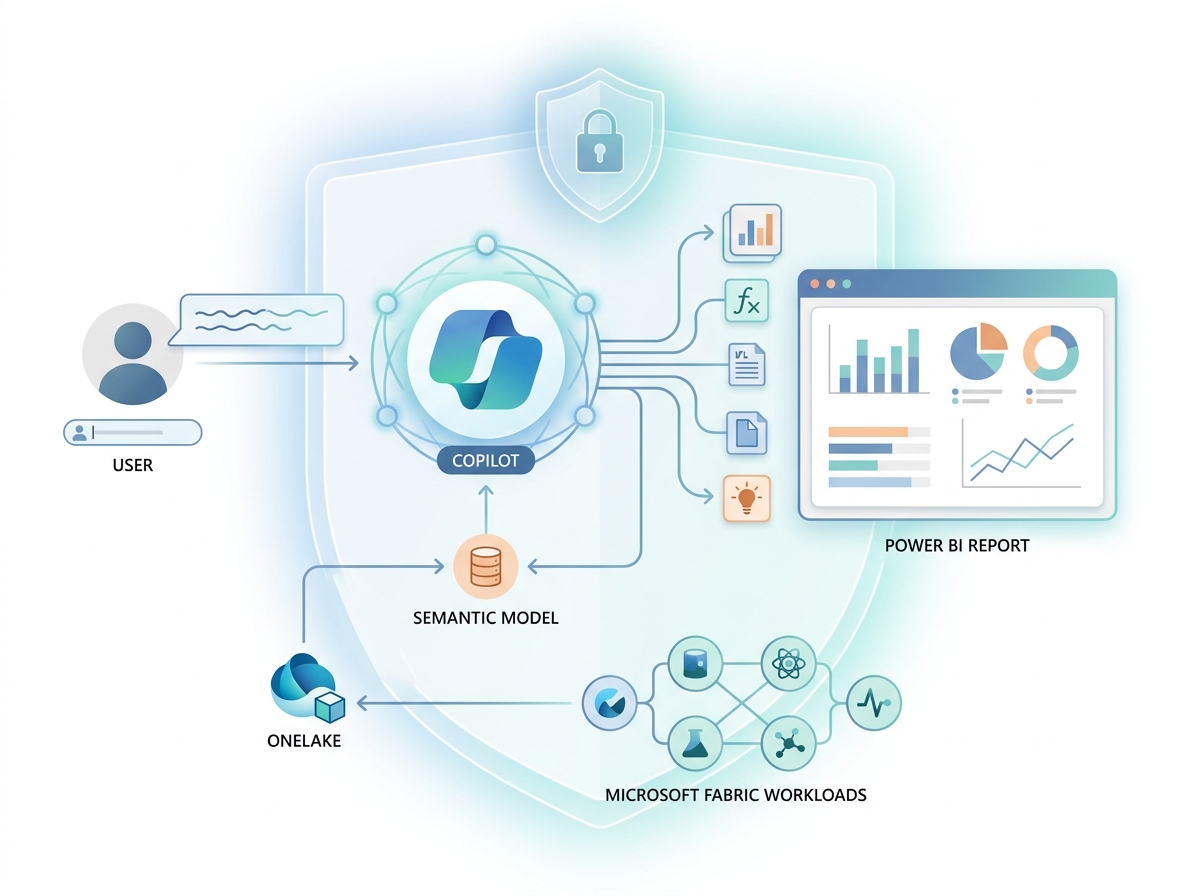
Artificial intelligence has moved from a buzzword to a working tool inside analytics platforms, and Microsoft Fabric Copilot sits right at the center of that shift. Instead of writing every measure, query, and report by hand, you can now describe what you want in plain language, and Copilot helps you build it. However, Copilot is not magic, and it is not ChatGPT. It works because it grounds itself in your governed data and your semantic models. This guide explains what Microsoft Fabric Copilot is, how it works across the platform, and how enterprises use it responsibly.
Key Takeaways
- Microsoft Fabric Copilot is an AI assistant built into Fabric that helps you build reports, write DAX, transform data, and generate insights using natural language.
- Copilot grounds its answers in your semantic models and governed data, so the quality of your model directly shapes the quality of its output.
- Unlike a general chatbot, Copilot runs inside your tenant under Microsoft Entra ID and Purview governance, and it respects existing permissions and row-level security.
- Copilot now runs on any paid Fabric capacity from F2 upward, though it consumes capacity compute, and viewers on smaller capacities still need Pro licenses.
- Copilot assists people; it does not replace them, because every output still needs human review, especially in regulated settings like healthcare.
This article builds on Microsoft Fabric Explained and Power BI Semantic Models. Because Copilot leans heavily on both, a quick refresher on either will make this guide land better.
What Is Microsoft Fabric Copilot?
Microsoft Fabric Copilot is an AI assistant built directly into the Fabric platform. It lets you work with your data using natural language, so you can ask a question, describe a report, or request a calculation, and Copilot helps you create it. In short, it brings generative AI into the everyday flow of analytics work.

Crucially, Copilot does not float free of your data. Instead, it connects to the data and models inside your Fabric tenant, and it answers based on them. Therefore, when you ask Copilot about revenue or patient admissions, it draws on your actual, governed data rather than guessing from the open internet. According to Microsoft’s Fabric Copilot overview, the assistant works across the platform’s workloads to accelerate common tasks. As a result, Copilot behaves less like a chatbot and more like a knowledgeable colleague who already understands your data estate.
Why Microsoft Built Copilot into Fabric
Microsoft built Copilot into Fabric to lower the barrier to analytics. For years, getting value from data required specialized skills: writing DAX, modeling data, building pipelines, and coding transformations. Consequently, many business users depended on a small number of experts, and work often queued behind them. Copilot aims to change that balance.
Moreover, even skilled developers spend a lot of time on repetitive work. They write similar measures again and again, build routine visuals, and clean data in familiar ways. Because Copilot handles much of that repetition, it frees experts to focus on harder, higher-value problems. In other words, Copilot helps beginners do more and helps experts move faster.
Finally, Microsoft placed Copilot inside Fabric rather than beside it for a reason. Because Fabric already unifies data in OneLake under one governance model, Copilot can safely reach across that unified estate. Therefore, the same foundation that makes Fabric powerful also makes its Copilot trustworthy, since the AI operates within the platform’s security and governance rather than outside them.
How Fabric Copilot Works
Fabric Copilot works by combining a large language model with your grounded data context. When you type a request, Copilot does not simply answer from general knowledge. Instead, it gathers relevant context from your data, your semantic model, and the task at hand, and then it uses that context to produce a grounded response.
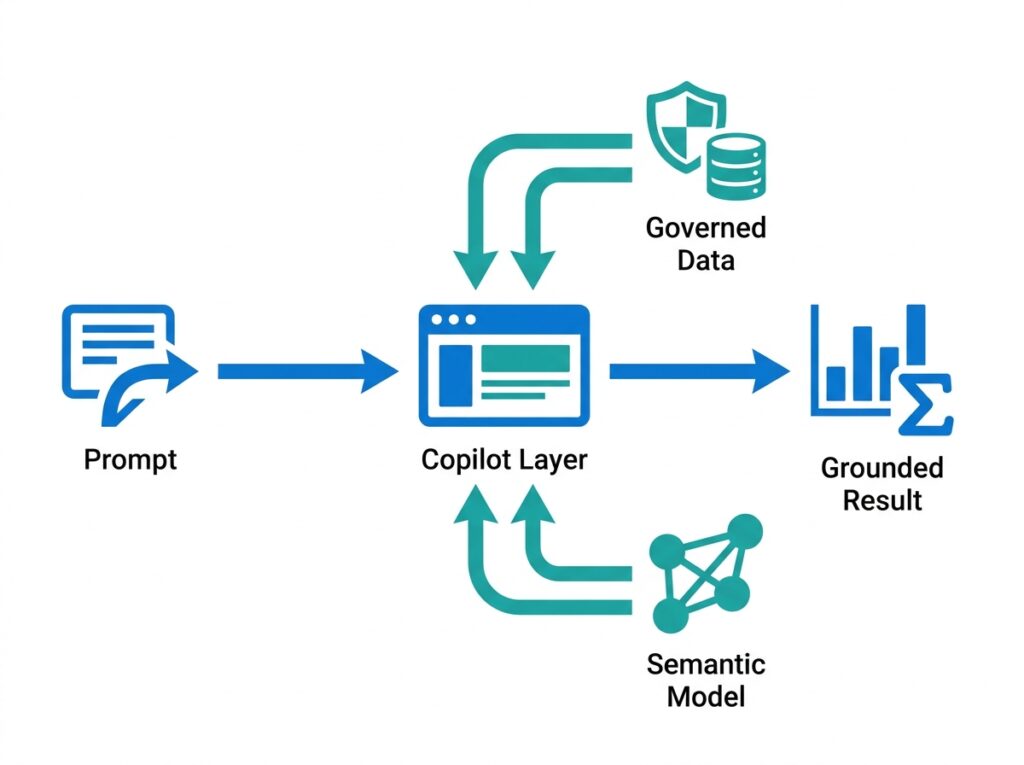
This grounding step matters enormously. Because Copilot reads the structure and definitions of your model, it can generate answers that fit your actual data. For example, if you ask for “total revenue by region,” Copilot uses the measures and relationships your model already defines, rather than inventing them. As a result, its output aligns with how your business actually calculates things.
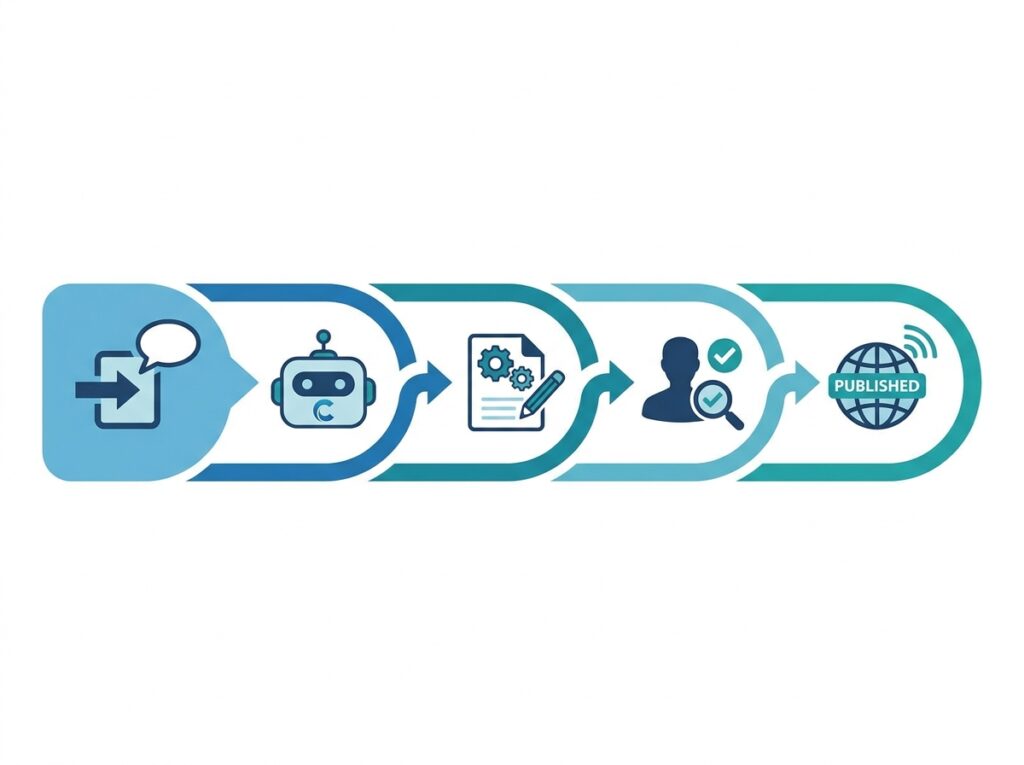
Importantly, Copilot then returns something you can use and check, whether a visual, a DAX measure, a summary, or transformation code. You review it, adjust it, and keep control. Therefore, Copilot acts as a fast first draft rather than a final authority, and that framing shapes every good practice around it.
Copilot Across Fabric Workloads
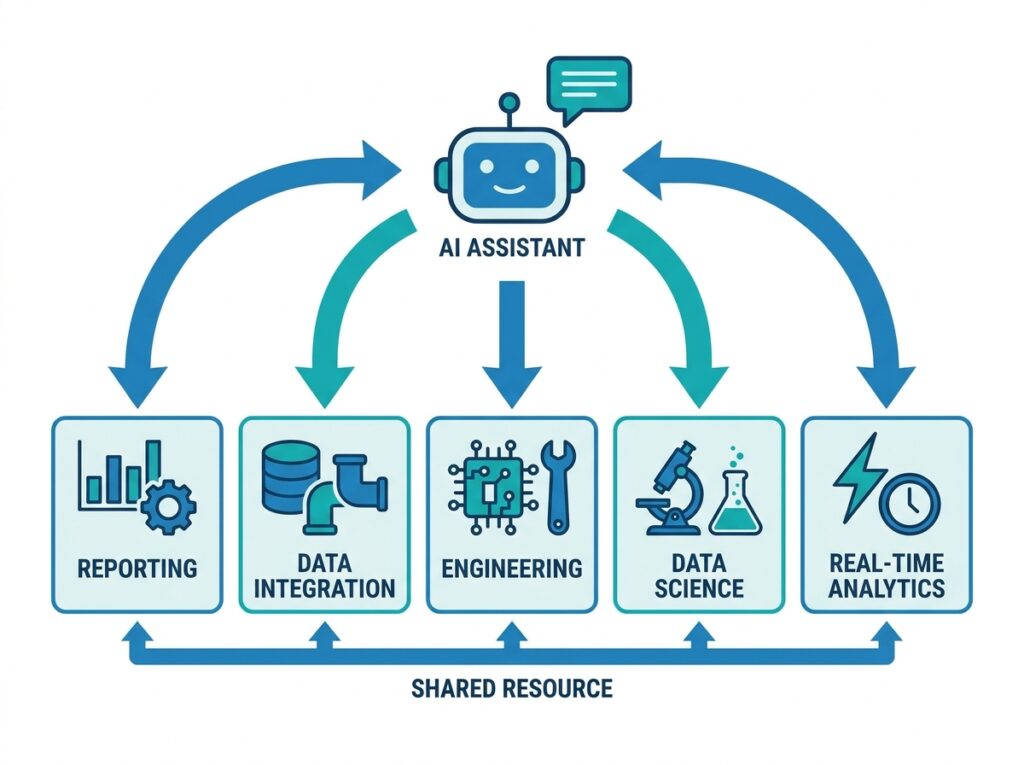
Copilot does not live in one corner of Fabric; instead, it spans the platform’s workloads. Because each workload handles a different job, Copilot adapts its help to the task in front of you.
| Workload | How Copilot helps |
|---|---|
| Power BI | Builds reports, writes DAX, summarizes data |
| Data Factory | Generates and explains data pipelines |
| Data Engineering | Writes and explains notebook code |
| Data Science | Assists with model and analysis code |
| Data Warehouse | Generates and explains SQL |
| Real-Time Intelligence | Helps query streaming and event data |
Notice the pattern across every workload: Copilot turns intent into a working artifact. In one place it writes a measure, in another it drafts a pipeline, and in another it produces SQL. Therefore, whatever part of the analytics lifecycle you work in, described more fully in Microsoft Fabric Explained, Copilot can shorten the distance between idea and result. The sections that follow zoom into the areas most readers care about first.
Copilot in Power BI
Copilot in Power BI is where most people meet the feature first, because reporting is Fabric’s most familiar workload. Here, Copilot helps you build visuals, understand your data, and communicate results, all through conversation.
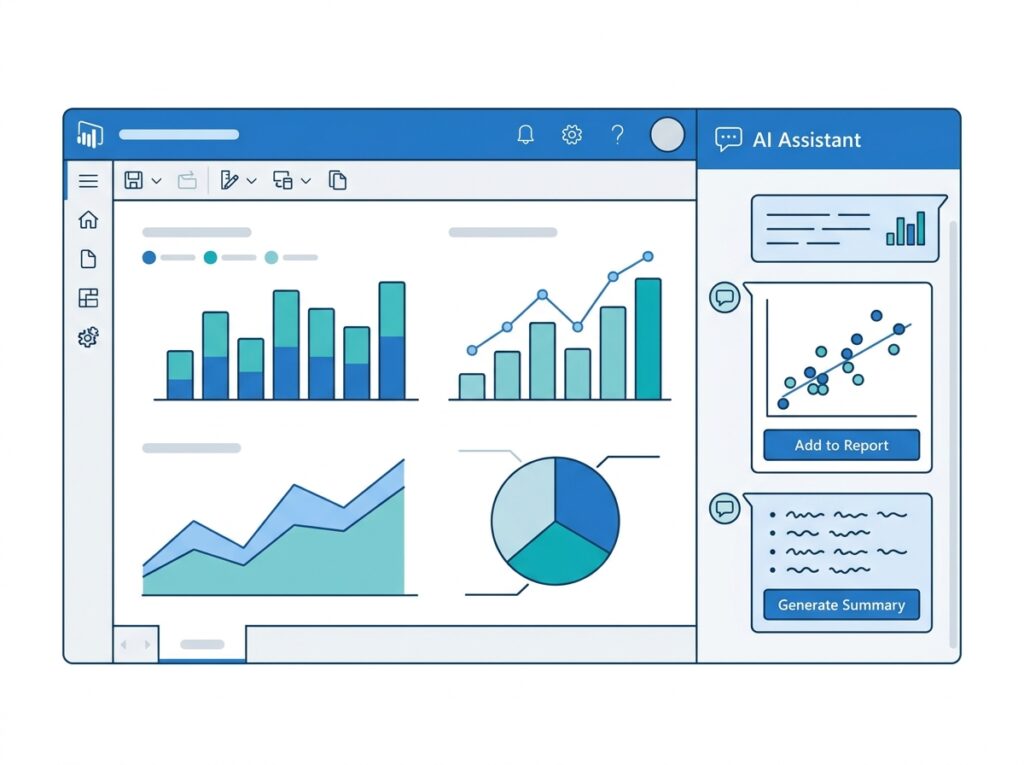
In practice, Copilot in Power BI does several helpful things. First, it can create report pages from a simple request, choosing sensible visuals for the question you ask. Second, it can summarize a report in plain language, so a reader instantly understands the key story. Third, it can answer questions about the data conversationally, which lets business users explore without building anything themselves. According to Microsoft’s Copilot in Power BI documentation, these experiences aim to speed up both building and consuming reports.
Even so, Copilot works best on a well-built foundation. Because it relies on your semantic model, a clean, well-named model produces far better results than a messy one. Therefore, the effort you invest in modeling pays off again the moment you turn on Copilot.
How Copilot Uses Semantic Models
Copilot uses your semantic model as its map of the business. Because the model defines tables, relationships, and measures, Copilot reads that structure to understand what your data means and how to answer questions correctly.

This dependence explains a simple but vital rule: better models produce better Copilot answers. When your semantic model uses clear names, well-defined measures, and sound relationships, Copilot interprets requests accurately. In contrast, when the model is cluttered or inconsistent, Copilot inherits that confusion and returns weaker results. Therefore, model quality becomes AI quality.
Because of this link, many enterprises now prepare their models specifically for Copilot. They document measures, tidy names, and certify trusted models, so the AI has a clean map to read. As a result, investing in semantic models delivers a double payoff: better reports for humans and better answers from Copilot.
Writing DAX with Copilot
One of Copilot’s most popular abilities is writing DAX. Because DAX intimidates many newcomers, this feature alone draws people to Copilot. You describe the calculation you want in plain language, and Copilot drafts the measure for you.

Copilot helps with DAX in two directions. First, it generates measures from a description, so a request like “year-over-year revenue growth” becomes a working formula. Second, it explains existing DAX, which helps you understand a measure someone else wrote. Together, these abilities make DAX far more approachable, and they pair naturally with the fundamentals in the DAX beginner guide.
Nevertheless, you should always review the DAX Copilot produces. Because AI can misread intent or context, a generated measure might calculate something subtly different from what you meant. Therefore, treat Copilot’s DAX as a strong starting point, then verify it against known numbers before you trust it in production.
Building Reports with Copilot
Beyond individual measures, Copilot can help assemble whole reports. When you describe the report you need, Copilot suggests pages, picks visuals, and lays out the story, which gives you a fast starting draft.

This capability changes how quickly reporting begins. Traditionally, an author started from a blank canvas and built every visual by hand, as described in the first dashboard guide. With Copilot, however, the author starts from a draft and refines it. As a result, the tedious first stage shrinks, and the author spends more time polishing insight rather than placing boxes.
Of course, the draft is only a draft. Because Copilot cannot know every nuance of your audience or intent, you still shape the final report yourself. Therefore, the best workflow treats Copilot as a rapid first pass, after which human judgment turns a decent draft into a genuinely useful report.
Copilot in Data Engineering and Notebooks
Copilot also helps data engineers who work in notebooks. Because notebooks mix code and analysis, Copilot can write, explain, and fix code, which speeds up the heavy lifting of data preparation.

In a notebook, Copilot supports several tasks. It can generate transformation code from a description, so an engineer states the goal and Copilot drafts the logic. It can also explain unfamiliar code, which helps teams understand and maintain each other’s work. Furthermore, it can suggest fixes when code fails, which shortens debugging. Because these tasks fill much of an engineer’s day, Copilot noticeably speeds up the work described in the Fabric data engineering workload.
Still, the same caution applies. Because generated code can contain subtle errors, engineers must read and test it rather than run it blindly. Therefore, Copilot works best as a knowledgeable pair-programmer whose suggestions you always review before you rely on them.
Copilot in Data Factory
In Data Factory, Copilot helps you move and transform data. Because pipelines can grow complex, Copilot’s ability to generate and explain them saves real time during data integration.
Specifically, Copilot can help build pipelines from a description of what you want to ingest and transform. It can also explain an existing pipeline, which helps a new team member understand how data flows. In addition, within Dataflows Gen2, Copilot assists with the Power Query transformations that shape data, a skill set covered in the Power Query guide. As a result, the ingestion stage of analytics becomes faster and more approachable.
Because ingestion often blocks everything downstream, speeding it up matters a great deal. When data arrives sooner and more reliably, every workload above it benefits. Therefore, Copilot in Data Factory quietly improves the whole analytics chain, even though users may never see it directly.
Microsoft Fabric Copilot vs ChatGPT
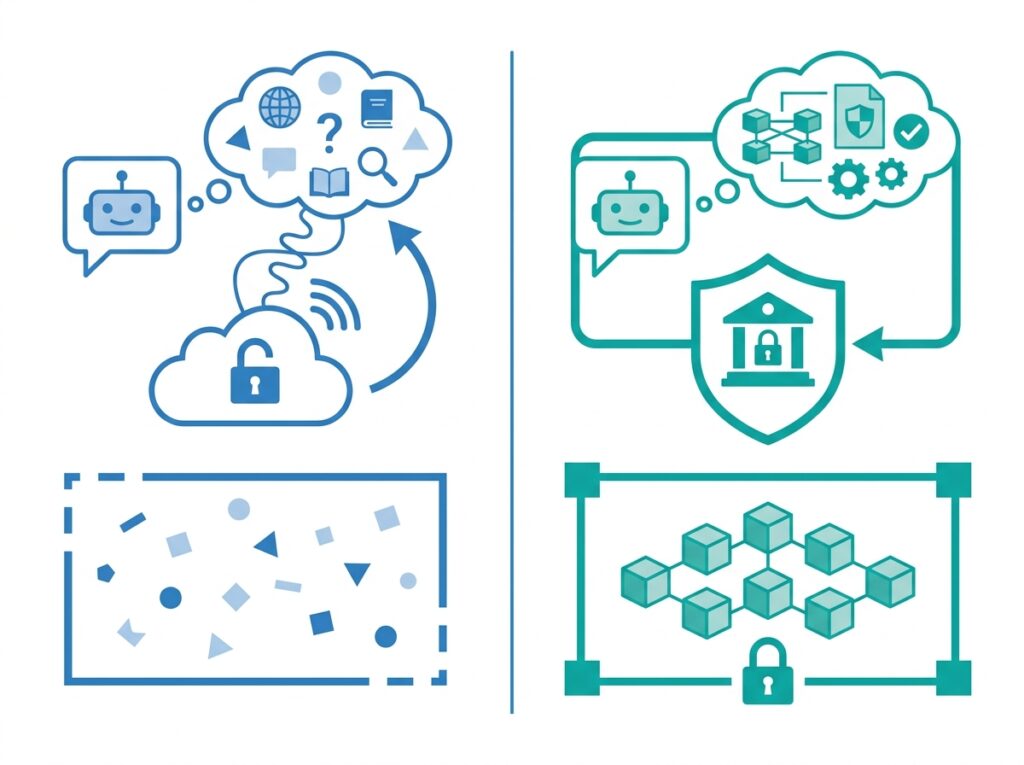
People often ask how Fabric Copilot differs from ChatGPT, since both use large language models. The difference, however, is fundamental: grounding and governance. ChatGPT is a general assistant that answers from broad training, whereas Copilot answers from your governed data inside your tenant.
| Feature | Fabric Copilot | ChatGPT |
|---|---|---|
| Grounded in your data | Yes | No, by default |
| Runs inside your tenant | Yes | No |
| Respects permissions and security | Yes | No |
| Understands your semantic model | Yes | No |
| General world knowledge | Limited focus | Broad |
| Best for | Enterprise analytics | General tasks |
The table makes the distinction clear. Because Copilot runs inside Fabric, it respects your permissions, reads your semantic model, and keeps your data within your governed boundary. ChatGPT, by contrast, excels at general tasks but has no built-in access to your enterprise data. Therefore, the two tools solve different problems, and Copilot is the one designed specifically for trusted, data-grounded analytics.
Copilot Security and Governance
Security sits at the heart of Copilot’s design, because enterprises will not trust an AI that leaks or ignores their controls. Fortunately, Copilot inherits the same governance that protects the rest of Fabric.

Several safeguards apply. First, Copilot uses Microsoft Entra ID for identity, so it only acts within a user’s existing permissions. Second, it respects row-level security, which means a user sees through Copilot only the data they could already see, as the row-level security guide explains. Third, it integrates with Microsoft Purview for governance and compliance. Because of these controls, Copilot cannot become a backdoor around your security.
Microsoft also states that it does not use your tenant’s data to train the underlying foundation models. Therefore, your business data stays yours. For regulated industries especially, this combination of identity, security, and data protection is what makes Copilot adoption realistic rather than risky.
Responsible AI in Copilot
Beyond security, Microsoft frames Copilot within its Responsible AI principles. Because generative AI can make mistakes or reflect bias, Microsoft builds in safeguards and, importantly, keeps a human in the loop.
In practice, responsible use means treating Copilot as an assistant, not an oracle. Copilot can generate a plausible answer that is still wrong, so you must review its output before you act on it. Microsoft’s Responsible AI guidance stresses exactly this: AI should augment human judgment rather than replace it. Therefore, organizations should train users to verify, question, and validate what Copilot produces.
This principle carries extra weight in sensitive fields. In healthcare, finance, or any regulated setting, an unchecked AI answer could cause real harm. Consequently, responsible adoption pairs Copilot’s speed with disciplined human review, so the organization gains efficiency without surrendering accountability.
Copilot Requirements and Licensing
Copilot licensing has become simpler and cheaper to start, though it still needs care. The key requirement is a paid Fabric capacity, because Copilot runs on capacity rather than on a standalone license.
Historically, Copilot required a large F64 capacity, which put it out of reach for smaller teams. Now, however, Copilot runs on any paid Fabric capacity from F2 upward, which makes a small pilot genuinely affordable. Even so, two caveats matter. First, Copilot consumes your capacity’s compute as it works, so heavy use can strain a small capacity. Second, on capacities below F64, viewers still need Power BI Pro licenses to collaborate. Microsoft’s Copilot capacity documentation explains how organizations can route AI workloads to a dedicated capacity to protect other workloads.
Because pricing, capacity behavior, and consumption rates change over time, you should always confirm current details with Microsoft before you budget. In short, plan for both a capacity and the seats of whoever authors with Copilot, and size that capacity for the AI demand you expect. This is one area where up-to-date verification genuinely matters.
Copilot Limitations
Copilot is powerful, yet it has clear limitations, and understanding them keeps expectations realistic. Above all, Copilot can be wrong. Because it generates language and code probabilistically, it sometimes produces answers that look confident but miss the mark.
Several other limits follow. First, Copilot depends heavily on your data and model quality, so poor inputs yield poor outputs. Second, it consumes capacity, which means broad, unplanned use can slow or exhaust a small SKU. Third, it does not understand your business context perfectly, so it can misread ambiguous requests. Fourth, it does not replace expertise, because someone still needs to judge whether an answer is correct and appropriate.
Because Microsoft develops Copilot rapidly, some of today’s limits will ease over time. Nevertheless, the core principle will remain: Copilot accelerates skilled work, but it does not remove the need for skill and review. Therefore, you should adopt it as a productivity multiplier, not as an autopilot.
Hospital Analytics Example
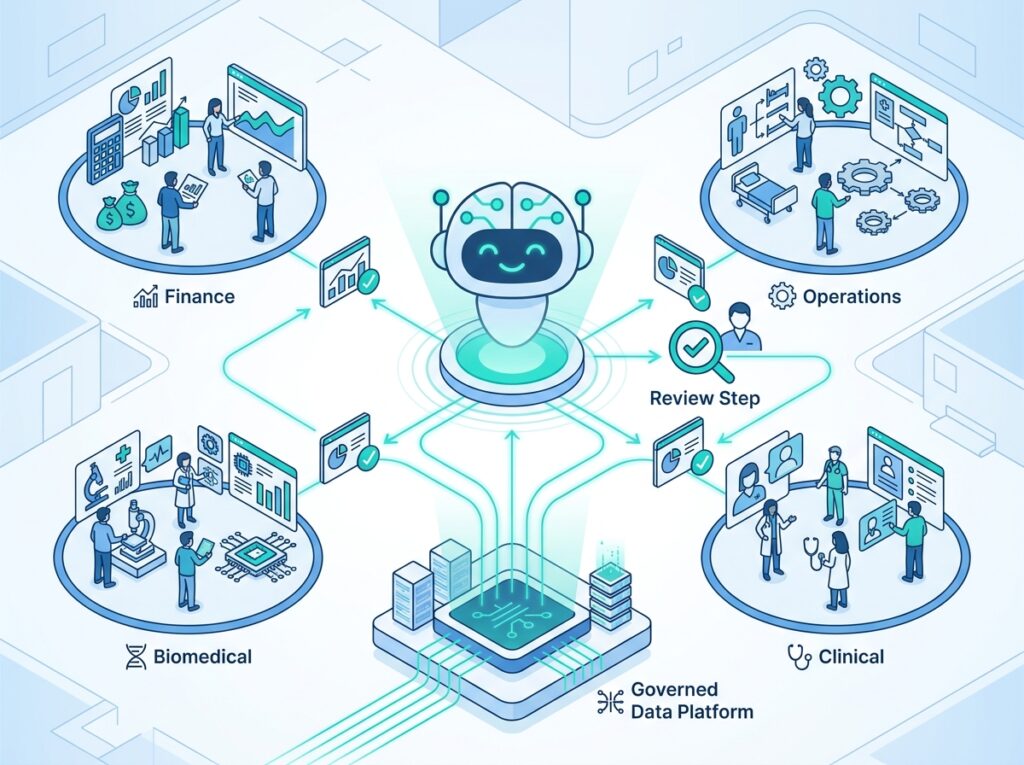
To ground these ideas, consider a large healthcare network that adopts Fabric Copilot across its analytics teams. This example shows both the speed Copilot delivers and the discipline responsible use demands.
The Organization
The network runs 40 hospitals with 3,500 medical devices, and many teams build analytics: finance, operations, Biomedical Engineering, and clinical reporting. Because these teams vary widely in technical skill, a tool that lowers the barrier promises real value.
Before Copilot
Previously, only a few specialists could write DAX, model data, or build pipelines. As a result, report requests queued behind those experts, and business users waited days for simple answers. Meanwhile, the experts spent much of their time on repetitive work rather than on the hard problems that needed them most.
After Copilot
After adopting Copilot on a certified enterprise semantic model, the picture changed. Business users asked questions in plain language and received charts and summaries directly. Analysts drafted DAX and reports far faster, then refined them. Crucially, the network added a firm rule: a human always reviews Copilot output before anyone uses it for a decision. Therefore, speed rose without sacrificing trust.
The Results
The benefits followed quickly. Report development sped up, the expert bottleneck eased, and business users gained more independence. Moreover, because Copilot read a governed, certified model, its answers stayed consistent with official definitions. Above all, the review rule kept the organization accountable, which matters enormously in a clinical setting. In short, the network gained AI speed while keeping human control, which is exactly the balance responsible adoption seeks.
Best Practices
Invest in clean semantic models first. Because Copilot grounds its answers in your model, a tidy, well-named, certified model produces far better results. Therefore, prepare your models before you scale Copilot.
Always review Copilot output. Since AI can be confidently wrong, treat every result as a draft. As a result, you catch errors before they reach a decision.
Size and protect your capacity. Because Copilot consumes compute, size your capacity for expected AI demand, and consider a dedicated Copilot capacity so AI does not starve your pipelines.
Govern access deliberately. Use Entra ID, permissions, and row-level security so Copilot respects who can see what. Consequently, the AI stays inside your security boundary.
Train your people. Teach users how to prompt well and how to verify results. Because good prompting and review habits decide Copilot’s real value, training pays off quickly.
Common Mistakes
Trusting Copilot blindly. Because Copilot can produce wrong answers that look right, using its output without review invites costly errors. Instead, always verify before you act.
Running Copilot on a messy model. When the semantic model is cluttered, Copilot returns weak results. Therefore, clean and certify your model first, so the AI has a clear map to read.
Ignoring capacity consumption. Since Copilot draws on capacity, an enthusiastic rollout can exhaust a small SKU and pause other workloads. Consequently, you should monitor usage and size deliberately.
Expecting Copilot to replace developers. Copilot accelerates work, yet it still needs expert judgment. Because someone must validate outputs, skilled people remain essential.
Skipping governance. Without proper identity and security, an AI rollout can expose data inappropriately. Therefore, set up Entra ID, permissions, and Purview before you scale.
Conclusion
Microsoft Fabric Copilot brings generative AI into the flow of everyday analytics, and it does so in a way enterprises can actually trust. Because it grounds itself in your semantic models and governed data, it produces answers that fit your business rather than generic guesses. Across Power BI, Data Factory, Data Engineering, and beyond, Copilot turns plain language into working reports, measures, and code, which helps beginners do more and experts move faster.
Even so, Copilot succeeds only alongside good practice. It needs clean models, careful governance, sensible capacity, and, above all, human review. Because it can be confidently wrong, it augments people rather than replacing them, and that balance defines responsible adoption. The hospital example captures the lesson well: the network gained real speed, but it kept a human in the loop for every decision. Therefore, as you bring Copilot into your own Fabric estate, invest in your semantic models, govern access, and always verify, because the organizations that pair AI speed with human judgment are the ones that win.
Frequently Asked Questions
Microsoft Fabric Copilot is an AI assistant built into the Fabric platform that lets you work with your data using natural language. It can build reports, write and explain DAX, generate pipeline and notebook code, and summarize data. Crucially, it grounds its answers in your governed data and semantic models inside your tenant, so it behaves like a knowledgeable colleague rather than a general chatbot.
Copilot does not carry a separate license fee, but it is not free either, because it requires a paid Fabric capacity. It now runs on any paid capacity from F2 upward, so a small pilot is affordable. However, Copilot consumes your capacity’s compute as it works, and on capacities below F64 viewers still need Power BI Pro. Because pricing and consumption change, confirm current details with Microsoft.
Yes. Writing DAX is one of Copilot’s most popular abilities. You describe the calculation you want in plain language, and Copilot drafts the measure. It can also explain existing DAX to help you understand a formula someone else wrote. Nevertheless, you should always review generated DAX against known numbers, because AI can misread intent and produce a subtly incorrect measure.
Yes. Copilot can help build reports by suggesting pages, choosing visuals, and laying out the story from a plain language brief. This gives you a fast starting draft instead of a blank canvas. However, the draft is only a starting point, so you still refine the visuals and shape the final report yourself to fit your audience and intent.
No. Copilot accelerates the work of Power BI developers, but it does not replace them. Because AI can be confidently wrong, someone must still validate its output, judge whether an answer is appropriate, and handle complex modeling and design. In practice, Copilot helps beginners do more and helps experts move faster, so skilled people remain essential.
Copilot uses your semantic model as its map of the business. Because the model defines tables, relationships, and measures, Copilot reads that structure to understand your data and answer correctly. This means better models produce better Copilot answers. A clean, well-named, certified model gives accurate results, while a cluttered model produces weaker ones, so model quality becomes AI quality.
Yes. Copilot inherits Fabric’s governance. It uses Microsoft Entra ID for identity, so it acts only within a user’s existing permissions, and it respects row-level security, so users see only data they could already access. It also integrates with Microsoft Purview for compliance. In addition, Microsoft states it does not use your tenant’s data to train the underlying foundation models, so your data stays yours.
The core difference is grounding and governance. ChatGPT is a general assistant that answers from broad training and has no built-in access to your enterprise data. Fabric Copilot, by contrast, runs inside your tenant, reads your semantic model, respects your permissions and security, and answers from your governed data. Therefore, Copilot is designed specifically for trusted, data-grounded analytics, while ChatGPT suits general tasks.
Yes, hospitals can use Copilot, and many find it valuable for speeding up analytics across finance, operations, and clinical teams. Because Copilot respects Entra ID, permissions, and row-level security, it fits regulated environments. However, healthcare demands extra care: teams must review every Copilot output before acting, protect sensitive data, and keep a human in the loop, since unchecked answers could affect patient care.
Copilot can be confidently wrong, so its output always needs review. It also depends on data and model quality, so poor inputs yield poor answers. In addition, it consumes capacity, which can strain a small SKU, and it does not fully understand your business context, so it can misread ambiguous requests. Above all, it does not replace expertise, because someone must judge whether each answer is correct and appropriate.